









If you are considering using Fairplay, one of the first questions you may have is: Is Fairplay safe? Before creating or accessing an account, it is sensible to understand website security, privacy, account protection and the steps you can take to reduce common online risks.
Fairplay users should not rely only on promotional claims when assessing safety. Instead, they should check the website address, review available privacy and account information, protect their login credentials and use official account-recovery and support channels.
This article explains the key Fairplay security, privacy and account-safety considerations in simple terms so that users can make informed decisions.
Important: Website features, policies, account options and availability can change. Always check the latest information provided through the official Fairplay website before relying on any particular feature or policy.
Is Fairplay Safe?
The answer depends on several factors rather than one security feature.
When evaluating Fairplay, users should consider whether the website uses a secure connection, whether account-management and recovery processes are clear, what privacy information is available, and whether there is a reliable way to get assistance with account-related problems.
It is also important to remember that no online platform can guarantee complete protection from every security threat. Users have a responsibility to protect their own passwords, devices and account information.
A safer approach is therefore to review the information that can be verified and follow good online-security practices.
If you are new to the platform, you can first learn more about the service through our Fairplay beginner’s guide.
How We Evaluate Fairplay Safety
A useful safety assessment should focus on information that users can actually check.
Here are the main areas worth reviewing:
| Safety area | What users should check |
| Website security | Whether the website uses HTTPS and a secure connection |
| Account protection | Available login, password and account-management controls |
| Verification | What information is requested during registration or account verification |
| Privacy | Whether clear information about personal data is available |
| Account recovery | Whether there is an established process for recovering account access |
| Support | Whether users can contact the appropriate support channel |
| Transparency | Whether important terms and policies are accessible |
| User responsibility | Whether users follow basic online-security practices |
This approach provides a more realistic way to assess an online service than simply describing it as completely safe or unsafe.
Fairplay Website Security
Website security is one of the first things users should check before entering personal or account information.
A secure HTTPS connection helps protect information transmitted between your browser and the website. You can normally check this through the address bar in your browser.
However, HTTPS by itself does not prove that every aspect of an online service is trustworthy. Users should also consider privacy information, account controls, transparency and the authenticity of the website.
Check the Website Address Carefully
One of the biggest risks for users of popular online services is phishing.
A fraudulent website may copy the appearance of a legitimate platform and attempt to collect login details or other sensitive information.
Before entering your Fairplay credentials:
- Check the website address carefully.
- Look for unusual spelling or domain variations.
- Avoid suspicious shortened links.
- Be cautious with links received through unknown messages.
- Do not enter your password on unfamiliar websites.
- Keep your browser and device software updated.
When accessing your account, use the current official website information rather than relying on random links shared through third-party websites.
For users who want to understand the login process, our Fairplay login guide provides additional information.
Fairplay Account Security
Account security depends on both the controls offered by a platform and the choices made by the user.
Even if an online service has security measures in place, a weak or reused password can still create unnecessary risk.
Use a Strong, Unique Password
Your Fairplay password should be difficult for other people to guess.
Avoid using obvious information such as:
- Your name
- Date of birth
- Mobile number
- Simple number sequences
- Common words
- The same password used on other websites
Using a different password for every important online account reduces the risk of one compromised password affecting multiple services.
A password manager can also help you create and store unique passwords.
Never Share Login Credentials
Your password should remain private.
You should also avoid sharing verification codes, recovery codes or other confidential account information with people who contact you unexpectedly.
Be especially careful if someone claims to be a support representative and asks for your password or security code.
When you need assistance, use the platform’s established support process rather than sending sensitive credentials through informal channels.
Review Account Activity
If account activity or login information is available to you, review it periodically.
Unexpected changes or unfamiliar activity may indicate that someone else has accessed your account.
If you notice something unusual, change your password and follow the appropriate account-recovery or support process.
For more information about managing account-related settings, you can also read our Fairplay account management guide.
Fairplay Privacy and Personal Information
Privacy is an important part of evaluating any online service.
Before submitting personal information, users should understand what information may be requested and why it may be needed.
Look for the latest privacy information provided by Fairplay and review it before submitting personal details.
Areas worth checking include:
- Information collected during registration
- Account-related information
- Verification requirements
- How information may be used
- Data-sharing information
- Data-retention information
- Available account or privacy controls
- Contact information for privacy-related questions
Privacy policies can change, so users should always refer to the latest available version rather than relying on old articles or third-party summaries.
If you are still deciding whether to create an account, our Fairplay ID registration guide can help you understand the general registration process.
What Information Should You Avoid Sharing?
Users should be particularly careful when someone requests sensitive information through unofficial channels.
Never casually share:
- Your password
- One-time verification codes
- Account recovery codes
- Private security information
- Sensitive financial credentials through unverified contacts
If someone sends you an urgent message asking you to confirm account information, stop and verify the request first.
A message that creates pressure or threatens immediate account closure should be treated cautiously until its authenticity has been confirmed.
Fairplay Account Recovery and Password Protection
Account access can sometimes be lost because a password is forgotten or because suspicious activity is detected.
When this happens, use the official account-recovery process rather than clicking recovery links from unknown sources.
If you have forgotten your password, follow the current password-reset procedure available through Fairplay.
For step-by-step information, see our Fairplay password reset guide.
If you believe someone else has accessed your account, change your password as soon as possible and contact the appropriate support channel if you need additional assistance.
Common Fairplay Security Risks to Avoid
Many account-security problems can be prevented by recognizing common online threats.
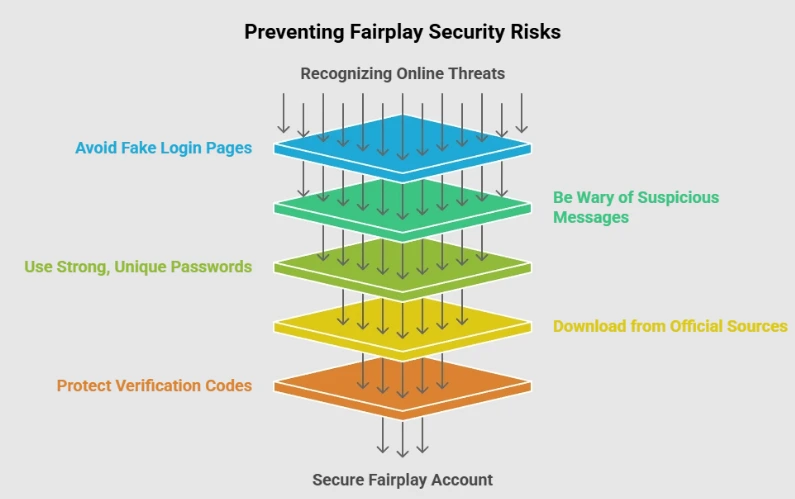
Fake Login Pages
Fake login pages can look almost identical to legitimate websites.
Always check the domain before entering your username or password.
Suspicious Messages
Be cautious with messages claiming that your account has an urgent problem.
Instead of immediately clicking a link, visit the official website independently and check your account there.
Reused Passwords
Using the same password across multiple websites increases your exposure if one of those services experiences a security incident.
Use a unique password for your Fairplay account.
Unofficial Downloads
Do not download applications, files or software from unknown sources.
If an official application or access method is available, confirm it through the current official Fairplay website before downloading anything.
Sharing Verification Codes
Verification codes should be treated as confidential.
Never give a code to someone simply because they claim to be helping you with your account.
How to Protect Your Fairplay Account
You can improve your account security with a few simple habits:
- Use a strong and unique password.
- Never share your password or verification codes.
- Check the website address before logging in.
- Avoid suspicious links and messages.
- Keep your browser and device updated.
- Avoid accessing important accounts through untrusted devices.
- Review account activity when relevant information is available.
- Follow the latest security instructions provided by the platform.
- Use official account-recovery options if you lose access.
- Contact the appropriate support channel if you notice suspicious activity.
These practices are not limited to Fairplay. They are useful for protecting almost any important online account.
How to Identify the Official Fairplay Website
Checking the website address is one of the easiest ways to reduce the risk of phishing.
Search engines, social media platforms and third-party websites can contain links that do not lead to the website you intended to visit.
Before logging in:
- Check the domain carefully.
- Look for spelling mistakes.
- Avoid unfamiliar redirects.
- Be cautious with links from unknown social media accounts.
- Do not assume that a familiar-looking design means a website is genuine.
- Save the verified website in your browser if you use it regularly.
For account-related actions, always rely on current official information.
What to Do if You Suspect Your Account Has Been Compromised
If you think another person may have accessed your account, take action as soon as possible.
Step 1: Change Your Password
Use the official website to change your password.
Choose a new password that you have not used elsewhere.
Step 2: Secure Other Accounts
If you used the same password on other websites, change those passwords as well.
Step 3: Check Your Account
Look for unfamiliar activity, changes to account information or anything else that you do not recognize.
Step 4: Contact Support
If you cannot secure the account yourself, use the official support process for assistance.
Step 5: Avoid Unofficial Contacts
Do not provide your password, verification code or recovery information to someone who contacts you unexpectedly.
Fairplay Safety: What Users Should Verify
Rather than relying entirely on reviews or promotional statements, users should perform their own basic checks.
Website
- Is the website address correct?
- Is the connection secure?
- Are you using the current official website?
Privacy
- Is privacy information available?
- Do you understand what information is being requested?
- Are the applicable policies current?
Account
- Is the login process clear?
- Is there a password-recovery process?
- Can you manage your account information?
Support
- Is there a clear way to contact support?
- Are you being asked for confidential credentials?
Personal Security
- Are you using a unique password?
- Is your device updated?
- Are you avoiding suspicious links?
These checks can help users make a more informed decision without relying on an unsupported claim that any online service is completely risk-free.
Fairplay Safety FAQs
Is Fairplay safe in 2026?
Fairplay safety should be assessed using current information about website security, account controls, privacy information and available support. Users should also follow basic security practices and verify the website before entering account information.
How can I protect my Fairplay account?
Use a strong, unique password, keep your login credentials private, verify the website address before signing in, avoid suspicious links and keep your browser and device software updated.
Should I share my Fairplay password with support?
No. Passwords and verification codes should be treated as confidential. If you need help, use the official support process instead of sharing private login credentials.
What should I do if I forget my Fairplay password?
Use the current official password-recovery process. Avoid using recovery links received from unknown people or websites.
You can also refer to our Fairplay password reset guide for additional information.
How can I avoid fake Fairplay websites?
Check the website address carefully before entering your credentials. Avoid suspicious links and verify the website through trusted official information.
What should I do if I notice suspicious account activity?
Change your password, review your account information and use the appropriate official support or recovery process. Do not share your password or verification codes with anyone who contacts you unexpectedly.
Final Verdict: Is Fairplay Safe?
There is no single feature that can make an online service completely risk-free.
When evaluating Fairplay safety, users should look at several factors, including website security, account protection, privacy information, account recovery, support and the authenticity of the website they are accessing.
Good personal security habits are equally important. Use a strong and unique password, keep your login information private, avoid suspicious links and verify the website before entering account details.
Most importantly, users should avoid relying on absolute claims such as “100% safe.” Online security is a shared responsibility, and the best approach is to make decisions based on current, verifiable information.