









Account verification is a very important part of using any online account. So, it helps to confirm who you are, keep your account safe, and stop any unwanted activity. Now, if you want to understand the Fairplay website verification process, then this guide is for you. Here, we will explain the basic steps, the documents you may need, the time it can take, and also the fixes for common problems.
So, maybe you are doing verification for the first time. Or maybe your last try failed. Either way, this guide will answer your most common questions in a very simple and easy manner.
Important: Verification rules can change based on the service, account type, your location, and the current rules. So, always follow the steps shown inside your account. Also, give only true and correct information.
What Is Fairplay Verification?
Fairplay verification is simply the process of confirming the details linked to your account. So, based on the situation, it may ask you to confirm your personal details, contact info, identity documents, or some other information asked through the official process.
Now, the main purpose is simple. It helps to prove that the account belongs to you, the real user. Also, verification can be a part of security checks. For example, this can happen when you log in from a new device, when you change your personal details, or when some unusual activity is noticed.
So, if you are a new user, then it is good to understand the verification rules before you upload any documents. That way, you make fewer mistakes and also avoid extra delays.
Why Is Account Verification Important?
Account verification helps in many ways. So, let us look at them:
- Identity confirmation: It helps to prove that your account details are genuine.
- Account security: It adds one more layer of safety against unwanted access.
- Information accuracy: It makes sure your account details match your documents.
- Compliance requirements: Some services must complete identity or KYC checks based on the current rules.
- Account recovery: Verified details can also help when you face account-access problems.
Now, if you are making an account for the first time, then it is useful to know the registration steps first. So, our Fairplay ID Registration Guide 2026 explains the full account creation process and the common doubts new users have.
What Is Fairplay KYC Verification?
Fairplay KYC verification simply means identity-related checks. So, here you may need to give some information or documents to confirm who you are.
Now, KYC means Know Your Customer. It is a common identity-check idea that many online services use. But the exact information asked can change. So, always follow the verification steps shown in the official account process.
So, a KYC check may involve these steps:
- First, you enter your personal information.
- Next, you confirm your account details.
- Then, you upload a valid identity document.
- After that, the system checks that your details match the account.
- Finally, you wait for the review to finish.
But remember, not every account goes through the same exact process. Also, rules can change over time. So, always check the current steps before you submit anything.
Fairplay Verification Process: Step-by-Step
Now, if your account needs verification, then you can understand the general process through these simple steps.
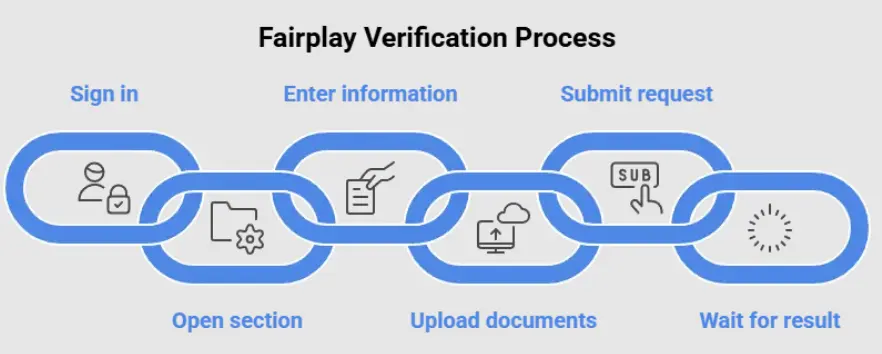
1. Sign in to your account
So, first, log in to your account through the correct official channel. Also, make sure you use the right login details. And please avoid typing your details on any strange or unknown websites.
Now, maybe you face login trouble even before verification. In that case, see our Fairplay Login Guide 2026 for common login fixes.
2. Open the verification section
Next, after you sign in, look for an account, profile, verification, security, or identity section. But the exact place and words may look different based on the current app or website.
So, always follow the steps shown in your account. Do not rely on screenshots or steps from unofficial places.
3. Enter your information carefully
Then, type your personal details exactly as they show on your documents.
Now, please give extra care to these points:
- Full name
- Date of birth
- Contact information
- Address, if asked
- Document details
So, even a small difference between your account details and your documents can cause extra checks. Or worse, it can cause a verification failure.
4. Upload the requested documents
Next, if documents are needed, then upload clear and valid copies through the official process only.
So, before you submit, check these things:
- The document is easy to read.
- All important info is clearly visible.
- The document is not expired.
- The image is not too blurry.
- You have picked the correct document.
- The info matches the details you typed.
But please, never submit edited, fake, or false documents.
5. Submit the verification request
Then, check everything one more time before you submit. Because wrong info can cause needless delays.
Now, once you submit, the request may go into a review stage. So, keep any confirmation or reference number the service gives you.
6. Wait for the verification result
Finally, the verification time can change based on the type of check, document quality, your account info, and if extra review is needed.
So, maybe it takes longer than you thought. In that case, check your account for any messages or requests for more info. But do not keep uploading the same documents again and again.
What Documents Are Required for Fairplay Verification?
Now, the exact Fairplay verification documents depend on the rules shown during the process.
So, based on the situation, you may be asked for an identity document or some other info to confirm your account details.
Now, some common examples used in online identity checks are:
- Government-issued identity documents
- Passport
- Driving licence
- Other accepted identity documents
- Proof of address, if asked
But here is one important point. Do not think that every document is accepted. So, always check the current verification steps before you upload anything.
Tips for Preparing Verification Documents
Now, to lower the chance of rejection, follow these tips:
- Use a valid document.
- Make sure the document is clear and easy to read.
- Avoid cropped images that hide important info.
- Avoid too much glare or reflection.
- Use the correct image format.
- Check that the name and other details match your account.
- Do not edit or change the document image.
So, if the system asks for one specific document, then submit that one. Do not swap it with another one, unless the system clearly allows other options.
How Long Does Fairplay Verification Take?
Now, one of the most common questions is this: how long does Fairplay verification take?
So, honestly, there is no single fixed time for every account. Simple checks can finish faster. But cases that need extra review can take more time.
Now, the verification time can depend on these things:
- Document quality
- Accuracy of your submitted info
- Type of verification
- Extra security checks
- If more info is requested
- Current review load
So, maybe your verification is still pending. In that case, please do not make many accounts. Also, do not keep uploading different documents again and again. Instead, just check if the service has asked for any more info.
Fairplay Verification Failed: Common Reasons
Now, a Fairplay verification failed message can feel very frustrating. But do not worry. It does not always mean there is a big problem with your account.
So, here are the common reasons:
Information mismatch
The personal details you typed at registration may not match the details on your document.
Poor document quality
A blurry, dark, cropped, or half-hidden document may not give enough info for the process.
Expired document
An expired identity document may not meet the verification rules.
Incorrect document type
If you upload a document that is not supported, then it can get rejected.
Missing information
If you have not given the required fields or documents, then verification can stay incomplete.
Additional security review
Some accounts may need extra checks before verification can finish.
How to Fix Fairplay Verification Problems
Now, if your verification did not work, then first read the exact message shown during the process.
So, after that, follow these simple steps:
1. Check your personal information.
First, make sure your name, date of birth, and other details match your documents.
2. Review the submitted document.
Next, check that it is valid, clear, complete, and meets the given rules.
3. Check for additional requests.
Then, see if the service has asked for another document or more info.
4. Follow the official resubmission process.
So, if you get another chance, submit the corrected info. But do not keep uploading the same rejected document again and again.
5. Contact the appropriate support channel if necessary.
Finally, if the reason is still not clear, then use the official support option. Also, give the account info that support asks for.
Now, for more account-related doubts, you can also check our Fairplay Account Management Guide.
How to Keep Your Verification Information Secure
Now, identity documents have very sensitive info. So, you must handle verification with care.
So, please follow these basic safety tips:
- Submit documents only through the official verification channel.
- Do not send identity documents to random people on messaging apps.
- Do not share passwords or one-time codes.
- Do not upload personal documents on unknown websites.
- Check the website address before you type any account info.
- Keep your email and account details safe.
- Check your account activity from time to time.
Now, safety matters a lot when identity documents are involved. So, is Fairplay Safe? Security Features, Privacy & Account Protection guide shares more info about account safety and privacy.
Fairplay Verification and Account Access
Now, verification and account access can sometimes link together. For example, you may get an extra verification request after you change your account info, try to recover access, or trigger a security check.
So, maybe you cannot open your account at all. In that case, fix the login problem first. Then, once you get access back, check if there is any pending verification request.
Also, keep your registered info correct and updated. Because that makes future account tasks much easier.
Frequently Asked Questions About Fairplay Verification
What is Fairplay verification?
Fairplay verification is an identity or account-checking process. So, it confirms the details linked to your account. But the rules can change based on the situation.
What is Fairplay KYC?
Fairplay KYC means Know Your Customer, or identity-related checks. So, these may ask you to give personal info or supporting documents when needed.
What documents are needed for Fairplay verification?
The needed Fairplay verification documents depend on the current verification steps. So, you may be asked for an accepted government-issued identity document or some other supporting info.
How long does Fairplay verification take?
Now, there is no single time for every account. So, it can depend on document quality, correct info, the type of check, and if extra review is needed.
Why did my Fairplay verification fail?
Verification can fail for many reasons. For example, mismatched info, unclear documents, expired documents, unsupported document types, missing info, or extra security checks.
Can I submit my documents again after verification fails?
So, if the process gives a resubmission option, then first check the reason. Then, fix the problem before you submit again.
Is verification required for every account?
Now, the rules can change. So, always follow the steps shown for your specific account. Do not assume that every user has the same rules.
How can I protect my verification documents?
Submit documents only through the official verification process. Also, do not share identity documents, passwords, or codes with unknown people or unofficial channels.
Final Thoughts
So, when you understand the Fairplay verification process, then account setup and management become much easier. Now, the most important steps are simple. First, give correct info. Next, use valid and clear documents. Then, follow the current verification steps. And finally, respond with care if extra info is asked.
So, maybe you see a Fairplay verification failed message. In that case, first check for mismatched info, blurry documents, expired documents, or missing details. But do not keep submitting wrong info again and again. Instead, use the official support process when you need help.
In the end, verification is all about confirming your account info and keeping it safe. So, when you prepare your documents with care and follow the official steps, then you avoid common errors. And that is how you make the whole process smooth and easy.